Contents
- Understanding SIMPLE IRA contributions: The rules you need to know
- How to find the mistakes in your SIMPLE IRA contributions
- Corrective Action: How to Fix Contribution Mistakes
- What Happens If You Don't Correct It
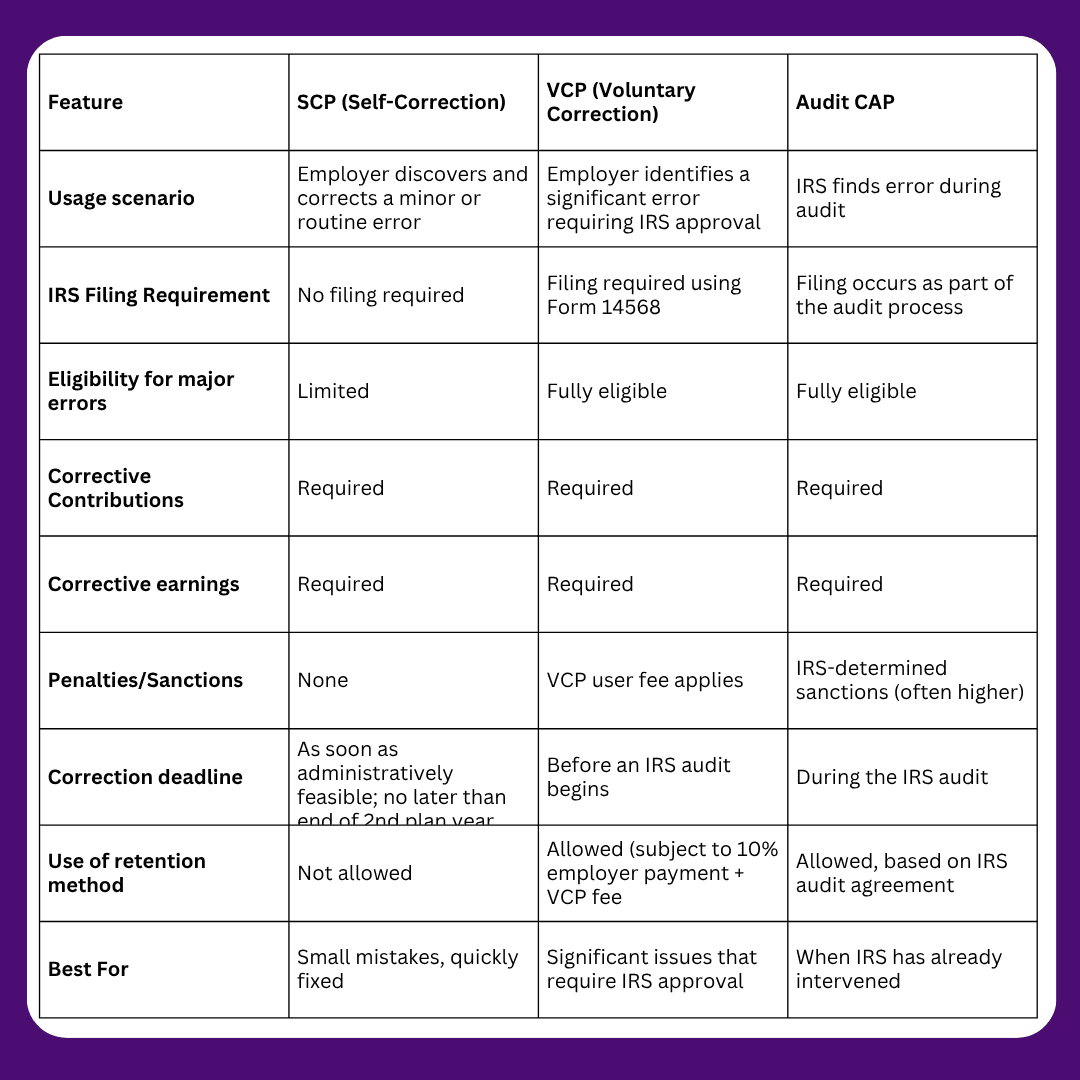
- IRS Correction Programs: Which One to Use?
- Comparison of IRS Correction Programs
- Important Deadlines for Corrections
- How WealthRabbit Simplifies this process
- FAQs
- Article Sources
Managing retirement plans can be overwhelming, especially when things don’t go as planned. Mistakes in contributions are one of the most common errors employers face with their SIMPLE IRA plans. But don’t worry! If you’ve made an excess contribution, whether too little or too much, you’re not alone, and fixing the mistake is more straightforward than you might think.
In this blog, we’ll dive into how to correct excess contributions in SIMPLE IRAs.
- For 2026, employees can defer up to $17,000 into a SIMPLE IRA, or $18,100 if their employer has 25 or fewer employees and offers the SECURE 2.0 enhanced limit. Catch-up contributions are $4,000 at age 50+, or $5,250 for ages 60 to 63.
- Employers must contribute either a 2% fixed non-elective contribution to every eligible employee, or a 3% matching contribution (reducible to as low as 1% for no more than 2 of any 5 consecutive years).
- Excess contributions of $100 or less don't need to be distributed or penalized.
- Larger excess contributions are corrected through the Distribution Method (return the excess) or the Retention Method (keep it in the account, pay the IRS 10% of the excess plus the applicable VCP fee).
- Left uncorrected, excess contributions trigger a 6% excise tax on the employee every year until removed, reported on Form 5329.
- Which correction program applies depends on severity: SCP for minor, self-correctable errors, VCP for significant errors needing IRS approval (2026 fees range from $2,000 to $4,000 based on plan assets), and Audit CAP only if the IRS finds the error first, during an audit.
- The new SECURE 2.0 mandatory Roth catch-up rule for high earners, effective 2026, does not apply to SIMPLE IRAs.
Understanding SIMPLE IRA contributions: The rules you need to know
As an employer offering a SIMPLE IRA plan, you play a crucial role in ensuring that both you and your employees are meeting the contribution requirements. Although the process may seem straightforward, there are specific rules and contribution limits that must be adhered to to avoid penalties.
There are two main types of contributions you can make to your employees' SIMPLE IRAs:
- The 2% Fixed Non-Elective Contribution: This means you, the employer, contribute 2% of each eligible employee's compensation, regardless of whether the employee decides to contribute to the plan themselves.
- The 3% Matching Contribution: In this case, you match employee contributions dollar for dollar, up to 3% of their compensation. However, you can reduce the employer match to as low as 1%, but you can only do this for 2 out of 5 consecutive years.
With the introduction of the SECURE 2.0 Act, employers have new options, and the dollar limits themselves have increased for 2026.
For businesses with 25 or fewer employees:
- Increased employee contribution limits: Employees can contribute up to $18,100 for 2026, which is higher than the standard contribution limit of $17,000.
- Standard employer contribution options remain: 3% match or 2% non-elective
For businesses with 26-100 employees:
- Standard employee contribution limits: Employees can contribute up to $16,500 (2025)
- Employer contribution Enhanced option: If the employer chooses a 4% matching contribution OR a 3% non-elective contribution, employees can contribute up to $18,100 (matching the small employer limit).
Catch-up contributions
Employees age 50 and older can contribute an additional $4,000 as a catch-up contribution in 2026. Under SECURE 2.0, employees aged 60 to 63 get a higher "super catch-up" limit of $5,250 instead of the standard catch-up amount. Miscalculating these catch-up amounts is one of the most common SIMPLE IRA contribution errors we see, so it's worth double-checking employee ages against the correct catch-up tier each year.
A quick note on the new Roth catch-up rule: Starting in 2026, SECURE 2.0 requires employees who earned more than $145,000 in prior-year wages to make their catch-up contributions on a Roth (after-tax) basis in 401(k), 403(b), and governmental 457(b) plans. This rule does not apply to SIMPLE IRAs, so you don't need to change anything about how catch-up contributions are handled in your SIMPLE IRA plan.
This gives smaller businesses the ability to offer more competitive retirement benefits.
But what happens when these contributions go wrong? How do you know if you've made a mistake? The good news is that there are ways to identify errors early and correct them before they become more significant problems.
How to find the mistakes in your SIMPLE IRA contributions
If you've reviewed the contribution rules and deadlines, but you're still unsure if you’ve made any mistakes, don't worry. It's not always obvious when things go off track. Here's how you can find out if you’ve contributed more or less than required:
1. Review the Plan Document and Contribution Terms
First things first: go back to your plan document. This document outlines the contribution terms you've agreed to follow, whether it’s the 2% fixed non-elective contribution or the 3% matching contribution. Ensure you are aware of the exact contribution method your business is using for the year.
Next, use your employees' compensation data to calculate the correct contribution amount for each eligible employee. Compare this with what you’ve already contributed. If the estimated amount doesn’t match the actual contribution, it’s a red flag that something might be off.
For example, if you were supposed to match 3%, but you only contributed 2%, you’ve under-contributed. Similarly, if you contributed 4% instead of the allowed 3%, you've over-contributed.
2. Check Your Deposit Dates
Now, let’s talk about timing. Even if you’ve calculated the correct amount, you need to ensure that your contributions were deposited on time. The IRS has specific deadlines for when contributions to your employees' SIMPLE IRAs must be made. If deposits were made after the deadline, you may face serious compliance issues.
Review your records to verify that all contributions were made before the required deadline. If you missed the deadline, you’ll need to correct the error, including making up for any lost earnings on late contributions.
Corrective Action: How to Fix Contribution Mistakes
If you've discovered that your SIMPLE IRA contributions are either too low or too high, the next step is correcting the mistake. Here’s how you can take the appropriate corrective action:
If You Contributed Less Than Required
If you’ve miscalculated the contributions and ended up contributing less than what was required by your SIMPLE IRA plan (based on the plan document and the annual notice), here’s what you need to do:
1. Make Up the Shortfall + Earnings
If you contributed less than required, you must contribute the missing amount and also add the earnings that the contribution would have earned if deposited on time.
For example, if you were supposed to contribute $1,000 to an employee’s SIMPLE IRA, but you only contributed $800, you’ll need to contribute the missing $200. You must also add earnings on the $200 from the date it should have been contributed until the date you correct. If the contribution was due in January but was made in March, you'll need to calculate how much interest or earnings the $200 would have earned during that time.
2. Use a Reasonable Interest Rate (if you can’t calculate earnings)
If you can't figure out the exact investment earnings from the SIMPLE IRA, the IRS allows you to use a reasonable interest rate, such as the rate used by the Department of Labor’s Voluntary Fiduciary Correction Program (VFCP) Online calculator. This is a standard rate you can apply if you're unsure of actual returns.
If You Contributed More Than Required
If you’ve accidentally contributed more than required, whether it’s a mistake in matching contributions or the 2% fixed non-elective contribution, there are two main ways to fix it. You can use either the Distribution Method or the Retention Method.
1. Distribution Method
One option is to distribute the excess contributions back, either to the employee or to the employer, depending on where the error occurred.
- Elective Deferrals (Employee Contributions): Suppose the excess contribution is because of elective deferrals (i.e., the employee contributed more than the IRS limit). In that case, you distribute the excess amount and report it as taxable income on Form 1099-R.
- Employer Contributions (Employer Mistake): Suppose the excess is from your side (e.g., an over-contribution in matching). In that case, you distribute the excess back to you (the plan sponsor) rather than the employee. The custodian will process this correction and still issue Form 1099-R to the employee, but the taxable amount will be zero, since the funds are being returned to you (the plan sponsor) rather than treated as employee income.
Suppose you accidentally contributed $1,000 more than required in matching contributions for an employee. You’d have that $1,000 returned to your business (the plan sponsor). The financial institution would issue Form 1099-R to the employee, showing a taxable amount of zero because the excess wasn’t the employee’s income.
Timing matters more than it looks. If an excess elective deferral is distributed before the employee's tax filing deadline, including extensions, only the earnings on the excess are taxable in that year. Miss that window, and the excess is taxed twice: once as income in the year it was contributed, and again when it's eventually distributed, on top of the 6% excise tax that accrues in the meantime (more on that below). It's also worth knowing that if the employee is within their first two years of participating in the SIMPLE IRA, an early distribution used to correct an excess can be subject to a 25% additional tax instead of the standard 10%, unless it qualifies as a proper timely corrective distribution.
2. Retention Method: Keeping the Excess in the IRA
If you prefer to leave the excess contributions in the employee’s SIMPLE IRA, you can use the Retention Method. However, this comes with additional actions:
- The excess amount remains in the employee’s SIMPLE IRA account.
- You, as the employer, must pay an amount to the IRS equal to at least 10% of the excess contribution, in addition to the Voluntary Correction Program (VCP) user fee.
- This method is not available under the Self-Correction Program (SCP).
If you have an excess contribution of $500, you’ll need to keep the $500 in the employee’s account (instead of returning it). But you must also pay an additional $50 (10% of the excess amount) as a penalty. Plus, if you go through the Voluntary Correction Program (VCP), you’ll need to pay any applicable fees.
3. Small Excess Contributions
If the total excess amount is $100 or less, you’re in luck! You don’t need to distribute the excess, and you’re not subject to the special additional fee.
If you made an over-contribution of $80, you don’t need to distribute it or pay any penalties. You can leave the excess amount in the account and move on without any issues.
What Happens If You Don't Correct It
If an excess contribution isn't corrected, it doesn't just disappear as a problem, it becomes a recurring one. Under IRC Section 4973, the employee owes a 6% excise tax on the excess amount for every year it stays in the account, and they're required to file Form 5329 to report it. This tax applies regardless of whether the employer has started a correction process, so the sooner an over-contribution is identified and fixed, the less this compounds. This is also a good reason to keep employees informed as soon as you discover an error affecting their account, since the excise tax is their personal tax liability, not the employer's.
IRS Correction Programs: Which One to Use?
Now, if you're dealing with excess contributions, the IRS has set up a couple of correction programs to help you fix the error. These programs vary depending on the size and nature of the error.
1. Self-Correction Program (SCP)
The Self-Correction Program (SCP) allows you to correct certain types of mistakes on your own, without having to notify the IRS. However, this program is only available for minor errors and when the mistake is corrected promptly. SCP also only covers operational failures (mistakes in how the plan was administered), not defects in the plan document itself. If the plan document is wrong, VCP is required regardless of how minor the resulting error looks.
What kinds of mistakes can be corrected with SCP?
- Minor errors such as missing or late contributions, or slight calculation mistakes. For example, if you made a small over-contribution that you correct on your own (without involving the IRS), this would be eligible for SCP.
How does it work?
- Correct the error: You must fix the mistake by correcting and then documenting what you’ve done.
- Timely correction: The correction must be made as soon as possible after you discover the error. This is typically done by the end of the plan year or before filing your tax return for the year in which the error occurred.
- No IRS notification required: You don’t need to send anything to the IRS unless the error is more complex or requires a formal review.
The Voluntary Correction Program (VCP) allows you to formalize the correction of more serious mistakes, including those that could disqualify your plan. It involves submitting a correction request to the IRS along with a correction fee.
When should you use SCP?
- If the mistake is minor and doesn’t result in significant tax consequences or penalties.
- For simple mistakes that can be corrected without the need for formal IRS intervention.
If you contributed too much to an employee’s SIMPLE IRA but the excess is less than $100 and you correct it promptly, you can use SCP. There’s no need to file with the IRS if it meets the SCP criteria.
2. Voluntary Correction Program (VCP)
The Voluntary Correction Program (VCP) allows you to formalize the correction of more serious mistakes, including those that could disqualify your plan. It involves submitting a correction request to the IRS along with a correction fee.
What kinds of mistakes can be corrected with VCP?
More significant errors, such as:
- Significant contribution errors (too much or too little).
- Late or missed contributions.
- Incorrect or missing participant notices.
- Failure to meet the SIMPLE IRA eligibility requirements.
How does it work?
- Submit the correction request: You need to submit a formal correction application to the IRS using Form 14568 (Model VCP Submission). This form includes a correction proposal and a payment for the applicable fee (which depends on the size of the error).
- Pay the correction fee: For 2026, VCP user fees for SEP/SARSEP/SIMPLE IRA plans are based on total plan assets: $2,000 for plans with $500,000 or less in assets, $3,500 for plans with $500,000 to $10 million, and $4,000 for plans over $10 million.
- IRS approval: After submitting your request, the IRS will review it and, if they agree that the correction plan is acceptable, they'll approve the correction. Once approved, your plan will be treated as compliant under IRS rules.
When should you use VCP?
- If the error is significant and SCP is not an option.
- If the error could lead to the disqualification of the SIMPLE IRA plan.
- If the error needs formal IRS approval to avoid penalties and retain the tax-advantaged status of the plan.
Let’s say you missed providing the annual notice to employees about SIMPLE IRA contributions, or you miscalculated a significant contribution. You’d need to use VCP to formally correct the mistake by submitting the appropriate forms and paying the required fees.
3. Audit Closing Agreement Program (Audit CAP)
The Audit Closing Agreement Program (Audit CAP) is for situations where the IRS is already auditing your SIMPLE IRA plan and discovers errors. This program allows you to correct the mistakes and enter into an agreement with the IRS to resolve the issue.
What kinds of mistakes can be corrected with Audit CAP?
Mistakes found during an IRS audit, such as:
- Large over-contributions or under-contributions.
- Late deposits.
- Missing or inaccurate participant notices.
- Other violations of SIMPLE IRA requirements were discovered during an audit.
How does it work?
- Audit findings: If the IRS finds the mistake during an audit, they will inform you of the issue.
- Agreement: You can enter into an agreement with the IRS to resolve the mistake. This typically involves paying additional penalties and fees, which are calculated based on the severity of the violation.
- Correct the mistake: You’ll need to make the necessary corrections (e.g., distributing excess contributions, providing missing notices, etc.).
- IRS approval: After making corrections, the IRS will close the audit and approve the correction. This can result in additional penalties or required payments, depending on the nature of the mistake.
When should you use Audit CAP?
- This is not something you choose to use, but rather something you must use if the IRS is auditing your plan.
- For situations where IRS intervention is unavoidable, you’ve been audited and need to correct errors to avoid disqualification and penalties.
If the IRS is auditing your SIMPLE IRA plan and discovers that you’ve been late with contributions for several years, you would need to work through the Audit CAP process, which would involve paying penalties and fees but allowing you to get back into compliance.
Comparison of IRS Correction Programs
Important Deadlines for Corrections
Understanding deadlines is critical, missing them can move you from SCP to VCP, or even into penalties under Audit CAP.
Under-Contributions
- SCP deadline: Correct as soon as administratively feasible, but no later than the end of the second plan year after the year the failure occurred
- Corrective contributions must include earnings through the actual correction date
Late Employer Contributions
- Must be deposited by your business tax filing deadline, including extensions
- If late, you must: deposit the missing contribution and add lost earnings from the date it should have been deposited.
Over-Contributions
The tax-filing-deadline window matters most. Distributing an excess elective deferral before the employee's tax filing deadline (including extensions) keeps the correction simple: only earnings are taxable that year. After that deadline, the excess is taxed twice, and the 6% excise tax under Section 4973 starts accruing annually until it's removed.
How WealthRabbit Simplifies this process
Identifying discrepancies, such as over- or under-contribution, by comparing plan details and checking the deposit can be time-consuming and complex. Something you might miss under the radar.
With WealthRabbit, you can generate a true-up report for the SIMPLE IRA This true-up report reconciles any discrepancies in contributions. Whether you’re dealing with over-contributions, under-contributions, or just making sure everything adds up. You can easily identify using the true-up reports.
FAQs
About the Author

Not sure which plan fits?
Answer three quick questions about team size and budget - we'll match you to a plan, no reading required.